⚔️ Factions
A faction is your team on OpenWar: a group of players who share a territory, a common chest, ranks and allies. It's the heart of the server — without a faction, you have neither a protected base nor access to team features.
📄 Related pages: Faction Permissions · Territory & Claim · Warzone · Faction Shop
🆕 Creating a faction
/f create <name>
- You must not already be in a faction.
- The name is 12 characters maximum.
- You automatically become Leader 👑, and the whole map is notified that a new faction has been born.
Right after creation, the game reminds you of the basics:
- /f menu — manage your faction
- /f claim — claim the chunk you're standing on
- /f sethome — set your base's respawn point
- /f chest — open the faction chest (on land you own)
🤝 Joining a faction
- An Officer or the Leader of a faction types
/f invite YourName. - You get an invitation in chat.
- You accept with:
/f join <faction name> - You join at the Recruit rank.
⚠️ No invitation = no entry. There's no application system: someone has to invite you.
🚪 Leaving a faction
/f leave
- You leave immediately, and your online teammates are notified.
- ❌ A Leader can't leave. They must first hand over command (
/f promoteuntil they pass on the role) or disband the faction with/f disband.
🎖️ The ranks
OpenWar uses 4 ranks, from lowest to highest:
| Rank | In-game color | Role |
|---|---|---|
| 🔹 Recruit | Dark gray | New member, limited rights |
| 🔸 Member | Light blue | Trusted member |
| ⭐ Officer | Gold | Right hand: can invite, claim, manage |
| 👑 Leader | Red | Faction chief, full control |
Promote / Demote
/f promote <player>      → moves the player up one rank
/f demote <player>       → moves the player down one rank
- You can only act on players of a rank lower than yours.
- If you promote someone all the way to Leader, you hand over command and drop back down to Officer.
🔐 What each rank is allowed to do (build, open chests, invite, claim…) is fully adjustable by the Leader. See Faction Permissions.
🖥️ The faction menu — /f menu
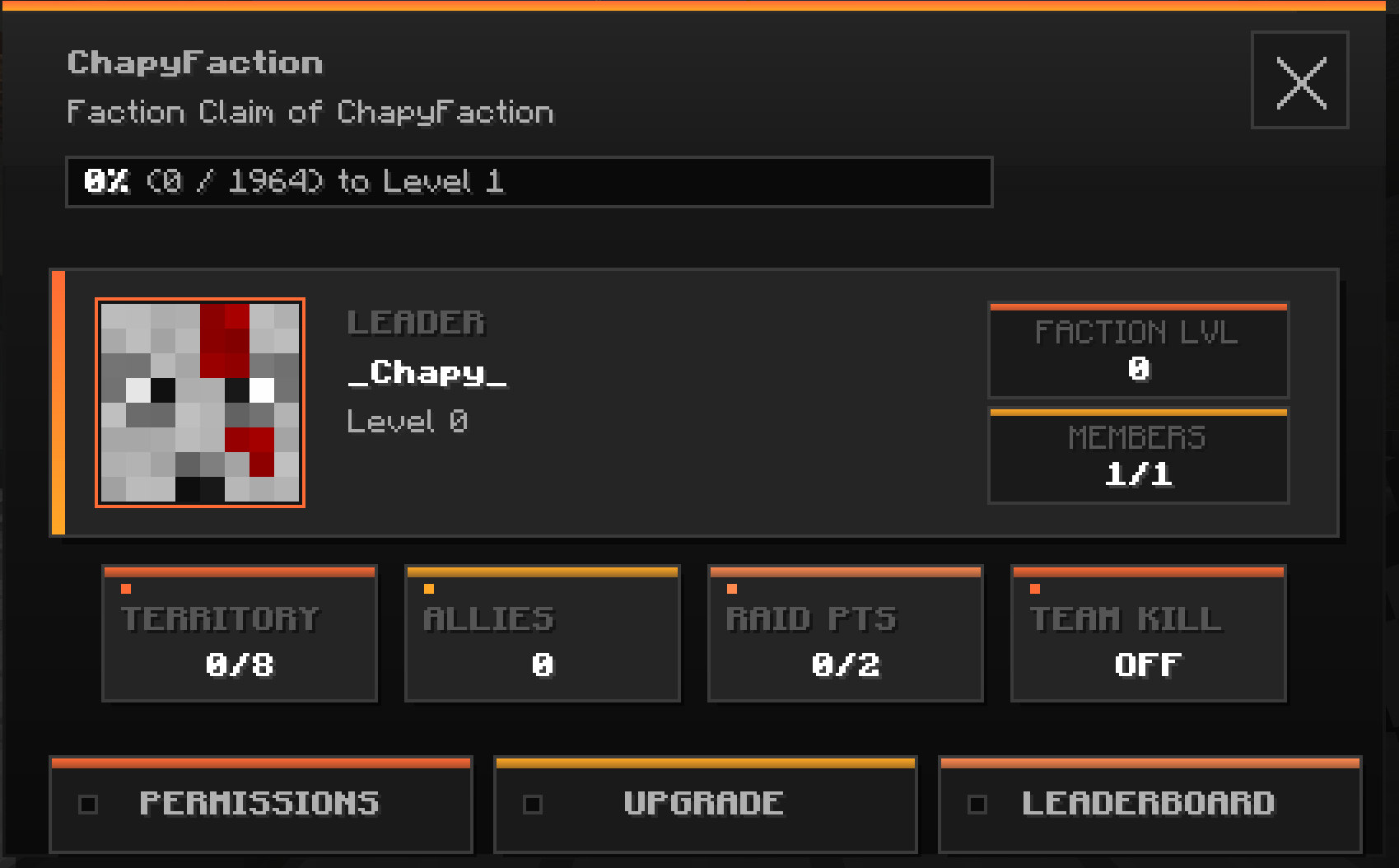
The /f menu command opens your faction's dashboard. There you'll find:
- The faction's name, description and level (with the XP bar toward the next level)
- The Leader's card (skin + level)
- Stats: Territory (chunks), Allies, Raid Points, Team Kill ON/OFF
- 3 buttons that open other screens:
- PERMISSIONS → per-rank rights settings (Leader)
- UPGRADE → faction upgrades/perks
- LEADERBOARD → the faction rankings
💡 PERMISSIONS, UPGRADE and LEADERBOARD open only from this menu (they're not commands you type).
🔼 Faction upgrades (Perks)
The menu's UPGRADE button opens your faction's perks. Good news: they unlock and improve on their own as your faction levels up — there's nothing to buy.
| Perk | What it improves | Tiers |
|---|---|---|
| 📦 Faction Chest | Slots in the common chest (/f chest) |
8 → 11 → 17 → 23 → 27 |
| 💜 XP Boost | Faster faction XP gain | +0 % → +10 → +15 → +20 → +25 → +30 → +50 % |
| 🟩 Claims | Max claimable territory | 8 → 16 → 24 → 32 → 38 → 48 chunks |
| ☢️ Nukes | Unlocks nuclear weapons (Little Boy, nuclear shells & warhead) | Locked → Unlocked at level 20 |
💡 How do you earn faction XP? In particular by capturing the Building in the Warzone (+120 XP/min).
💥 Raid Points (RP)
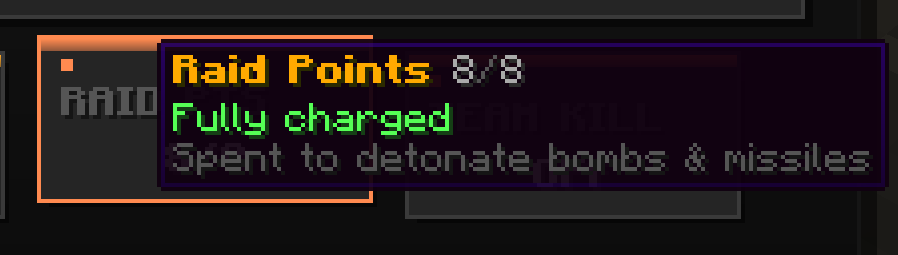
Raid Points are your faction's war resource (the RAID PTS card in /f menu). You spend them to trigger explosives: bombs, nukes, missiles, offensive grenades, destructive shells.
♻️ How you earn them
RP regenerate on their own over time — that's the only source (no gain from kills or captures). And the more you already have, the longer the next one takes:
| To reach… | Regeneration time |
|---|---|
| 1 RP | 20 seconds |
| 2 RP | 1 min 20 |
| 3 RP | 6 minutes |
| 4 RP | 12 minutes |
| 5 RP | 36 minutes |
| 6 RP | 4 hours |
| 7 RP | 8 hours |
| 8 RP | 12 hours |
| 9 RP | 24 hours |
| 10 RP | 48 hours |
⏱️ Regen runs continuously (even offline) and survives restarts. The countdown to the next point shows when you hover the RAID PTS card.
🔢 The maximum reserve
The cap depends on your faction level and your member count:
| Faction level | Cap (1 member) |
|---|---|
| 0 – 2 | 2 |
| 3 – 8 | 3 |
| 9 – 11 | 4 |
| 12 – 14 | 6 |
| 15 – 19 | 9 |
| 20+ | 10 |
Member bonuses (stacking): +1 at 2 members, +3 at 3, +2 at 5 → up to +6. A large high-level faction can therefore aim for ~16 RP of reserve.
💸 How you spend them
Each detonation / explosive shot consumes RP (the cost depends on the explosive):
- ✅ Enough RP → the explosive fires, green HUD:
-X RP · Y/Z left - 🚫 Not enough → shot denied, red HUD
NOT ENOUGH RAID POINTS(nothing is consumed) - 🚫 No faction → denied:
DETONATION DENIED - ☢️ Nukes additionally require faction level 20 (Nukes perk) → otherwise
NUKES LOCKED - 🏠 Too close to spawn → blocked:
TOO CLOSE TO SPAWN
💡 In short: you can't spam explosives. A strike is earned (regen time + a good faction level). Explosive details on the HBM side.
🛠️ Admin:
/afaction setraidpoints <faction> <number>sets a faction's RP.
🛠️ Running your faction day to day
| Action | Command | Who can? |
|---|---|---|
| Rename the faction | /f name <name> |
Rename permission |
| Change the description | /f desc <text> |
Rename permission |
| Common chest | /f chest |
Chest permission (on your land) |
| Toggle faction chat | /f chat |
Any member |
| Allow hits between members | /f tk |
👑 Leader |
| Ally with a faction | /f ally <faction> |
Diplomacy permission |
| Break an alliance | /f unally <faction> |
Diplomacy permission |
| Disband the faction | /f disband |
👑 Leader |
Faction chat (/f chat): once enabled, everything you type goes only to your teammates. Type /f chat again to return to global chat.
Team Kill (/f tk): when it's ON, members can hurt each other (training, accidents…); OFF, you're invulnerable to your teammates.
Allies (/f ally): an alliance needs both factions to agree (one proposes, the other accepts with the same command). Allies can't hit each other (outside the Warzone).
🏰 Territory, chest & home
- Claiming land:
/f claim(and the interactive map/f claim menu) → it's all detailed in Territory & Claim. - Faction Chest:
/f chest, accessible on a chunk owned by your faction (shared storage). - Faction Home:
/f sethomesets the base's respawn point (on your territory).
🚫 "/f home" is disabled — on purpose
Teleporting back to base (/f home) was deliberately removed for realism:
Less teleportation = more vehicle trips, and therefore more combat. The map isn't big enough to justify teleportation. It also forces you to build a real entrance to your base and to stay aboveground — more realistic gameplay.
📋 All faction commands
Alias:
/f=/faction
| Command | Effect | Access |
|---|---|---|
/f create <name> |
Create a faction | No faction |
/f join <faction> |
Join (after an invitation) | Invited |
/f leave |
Leave your faction | Except Leader |
/f disband |
Disband the faction | 👑 Leader |
/f invite <player> |
Invite a player | Invite perm. |
/f kick <player> |
Kick a member | Kick perm. |
/f promote <player> |
Promote | Higher rank |
/f demote <player> |
Demote | Ranks perm. |
/f menu |
Dashboard | Member |
/f info [faction] |
A faction's info | Everyone |
/f list |
List of factions | Everyone |
/f name <name> |
Rename | Rename perm. |
/f desc <text> |
Description | Rename perm. |
/f chest |
Faction chest | Chest perm. |
/f shop |
Faction shop | Member |
/f ally <faction> |
Propose/accept an alliance | Diplomacy perm. |
/f unally <faction> |
Break an alliance | Diplomacy perm. |
/f tk |
Team Kill ON/OFF | 👑 Leader |
/f chat |
Faction chat ON/OFF | Member |
/f claim |
Claim the current chunk | Claim perm. |
/f claim menu |
Open the claims map | Claim perm. |
/f unclaim |
Give up the current chunk | Claim perm. |
/f claimauto |
Auto-claim while walking | Claim perm. |
/f border |
Show the territory barrier | Member |
/f sethome |
Set the faction home | Home perm. |
/f home |
~~Teleport to base~~ | ❌ Disabled |
➡️ Up next: Faction Permissions · Territory & Claim · Warzone