🗺️ Territory & Claim
Claiming territory means marking chunks (16×16-block zones) as belonging to your faction. On claimed land, outsiders can't do anything — that's what protects your base from griefing and theft.
⚠️ You can only claim land in the Faction world (the world dedicated to bases). Use
/wto get there.
📍 Claiming a chunk
/f claim
Claims the chunk you're standing in. Requirements:
- ✅ Be in a faction with the Claim permission.
- ✅ The chunk isn't already claimed.
- ✅ It touches one of your existing chunks (adjacency rule — except for your very first claim).
- ✅ You haven't reached your claim limit (see below).
- ✅ The chunk isn't too close to spawn (protected zone).
🧩 Adjacency rule: each new chunk must be touching your territory (along a side). You can't claim an isolated zone — this forces you to build one single, connected base.
Auto-claim
/f claimauto
Toggles AutoClaim on/off: while it's active, every chunk you walk into is claimed automatically (if it's valid). Handy for laying out a base quickly.
🧭 The claim map — /f claim menu
/f claim menu
Opens a 15×15 chunk grid centered on you (requires at least 1 claim in this world).
| Color | Meaning |
|---|---|
| 🟩 Green | Your chunks |
| 🟦 Blue | Allied chunks |
| ⬛ Gray | Free land |
| 🟨 Yellow | Your force-loaded chunks |
🕵️ Enemy claims are invisible on the map: they show up as free land. You only see yourself and your allies.
Actions on the map: - Left-click a free chunk → claim it - Left-click one of your chunks → abandon it - Right-click one of your chunks → toggle force-load on/off
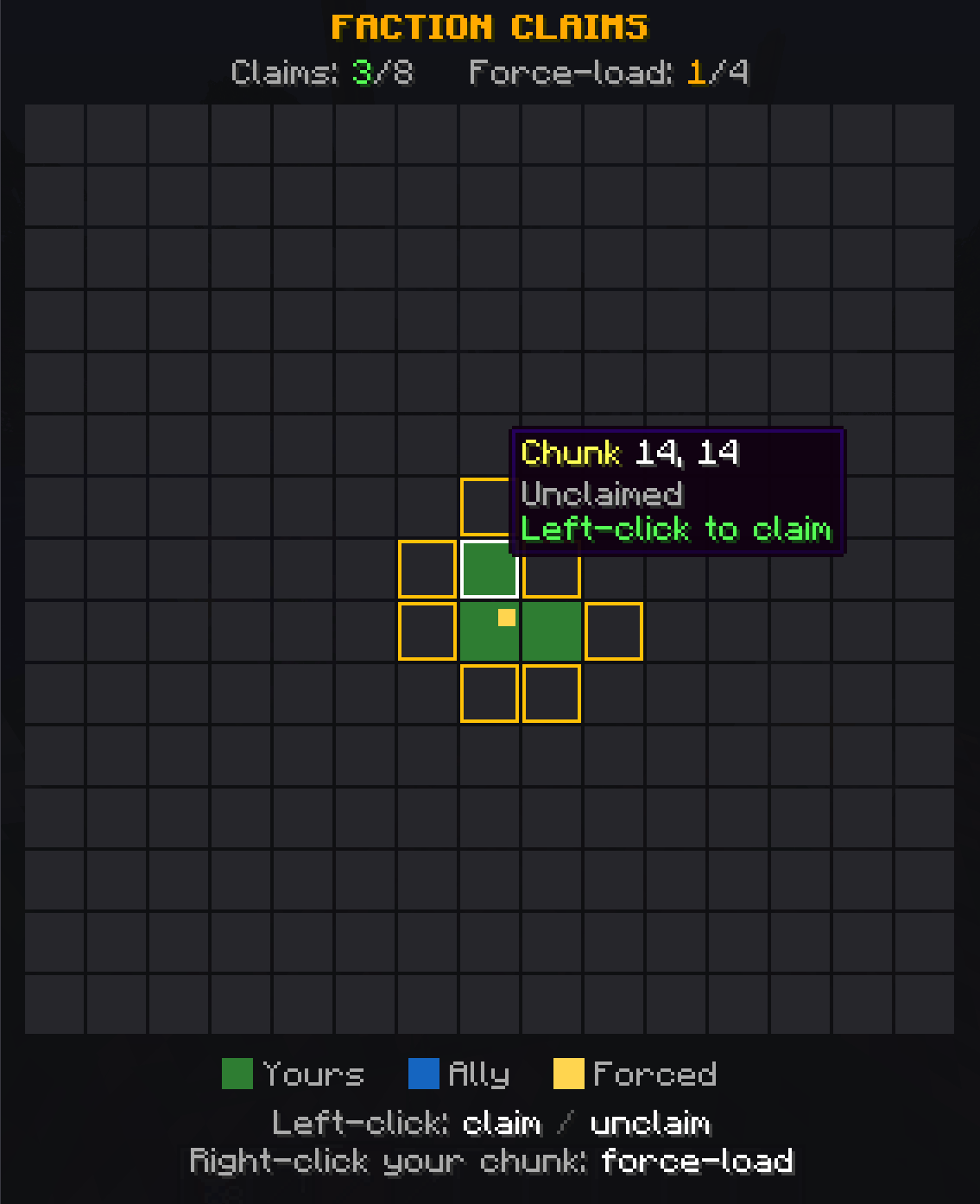
🔄 Force-load (keeping chunks loaded)
Force-load keeps a chunk active even when nobody's inside it — your farms, machines and systems keep running 24/7.
- Limit: 4 force-loaded chunks per faction.
- Enable it:
/f claim menu→ right-click one of your chunks.
🗑️ Abandoning a chunk — /f unclaim
/f unclaim
Abandons the chunk you're standing in.
🧷 Automatic contiguity: if abandoning a chunk splits your base in two, the detached zone is released automatically to keep your territory in one piece. The game warns you ("disconnected zone removed").
🚧 Seeing your borders — /f border
/f border
Shows (or hides) a glowing border all around your territory in the current world. Perfect for visualizing the exact extent of your base.
📏 Territory limit
Your chunk limit increases with your faction level (the Claims perk, automatic):
| Tier | Max chunks |
|---|---|
| 1 | 8 |
| 2 | 16 |
| 3 | 24 |
| 4 | 32 |
| 5 | 38 |
| 6 | 48 (max) |
➡️ Perk details on the Factions page.
🛡️ What does a claim protect?
On a claimed chunk, who can do what depends on the Faction Permissions:
- Build (place/break) → Build permission
- Open chests → Containers permission
- Levers, buttons, machines → Interact permission
- Doors & trapdoors → Doors permission
By default, set these permissions to OFF for the Neutral group: outsiders won't be able to touch anything in your base.
➡️ See also: Faction Permissions · Factions · Warzone